Tampilkan postingan dengan label Chrome. Tampilkan semua postingan

Google Chrome: New Security Features

Google has announced a number of security enhancements that "make it easier for developers to build secure web sites", writes Adam Barth, one of the software engineers working on the project. Some security features have already been implemented in other browsers, including Firefox and IE and in significant add-ons like NoScript.
Google Chrome Security Features

Chrome Security: Strict-Transport-Security

Strict-Transport-Security lets a high-security web site tell the browser that it wants to be contacted over a secure connection only. That means the browser will always use HTTPS to connect to the site and will treat all HTTPS errors as hard stops (instead of prompting the user to "click through" certificate errors).

Chrome Security: Cross-Origin Communication with postMessage

postMessage API provides a richer interaction and more secure communication between frames, and enables the creation of more secure versions of existing gadgets.

Chrome Security: CSRF Protection via Origin Header

The Origin header is a new HTML5 feature that helps you defend your site against cross-site request forgery (CSRF) attacks. In a CSRF attack, a malicious web site, say attacker.com, instructs the user's browser to send an HTTP request to a target server, say example.com, that confuses the example.com server into performing some action.

Chrome Security: ClickJacking Protection with X-Frame-Options

First introduced in Internet Explorer 8X-Frame-Options is a security feature that lets web sites defend themselves against clickjacking attacks. To defend against clickjacking, a web developer can request that a web page not be loaded inside a frame by including the X-Frame-Options: deny HTTP header. X-Frame-Options is implemented in Google Chrome, Internet Explorer 8, and Safari 4.

Chrome Security: Reflective XSS Protection

This feature protects against a type of cross-site scripting (XSS) attack. IE8 introduced an XSS filter which checks if a script that is about to be run is also present in the HTTP request for the page, which is a strong clue that it is an XSS attack. The XSS filter is similar to those found in Internet Explorer 8 andNoScript. Google is implementing their support in the WebKit rendering engine which has some technical advantages and also allows other WebKit-based browsers, such as Apple's, to get the same benefits.
Google Chrome for Mac is coming !

Google Chrome is available for Mac now. If you're on a Mac I would suggest trying it out. :-) Please follow the steps below:

Install Google Chrome on Mac (beta)

RequirementsOS X 10.5 or later, Intel only.
Download LinkGoogle Chrome for Mac
File size: 17.6 MB

The features of Google Chrome for Mac

For more details on this beta release of Google Chrome for Mac, read on in the Google Mac blog:
73,804 lines of Mac-specific code and 29 developer builds later, we're excited to finally release Google Chrome for Mac in beta. We took a hefty dose of goodness from the Windows version to build a fast, polished browser for Mac -- with features such as the Omnibox (where you can both search and type in addresses), themes from artists, and most importantly, speed. Try downloading Google Chrome for Mac and see what you think.
We also took great care to make Google Chrome a native application for Mac. For example, we integrated the Keychain into Google Chrome for Mac, and incorporated Mac-style animations when you open the Bookmarks bar.

The screenshots of Google Chrome for Mac

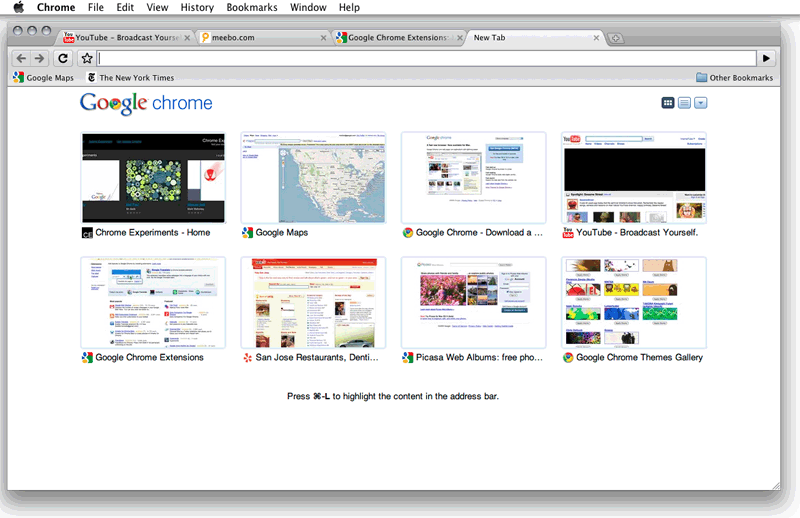
  • Google Chrome for Mac, on the New Tab page
  • Screenshot: Google Chrome for Mac, on the New Tab page
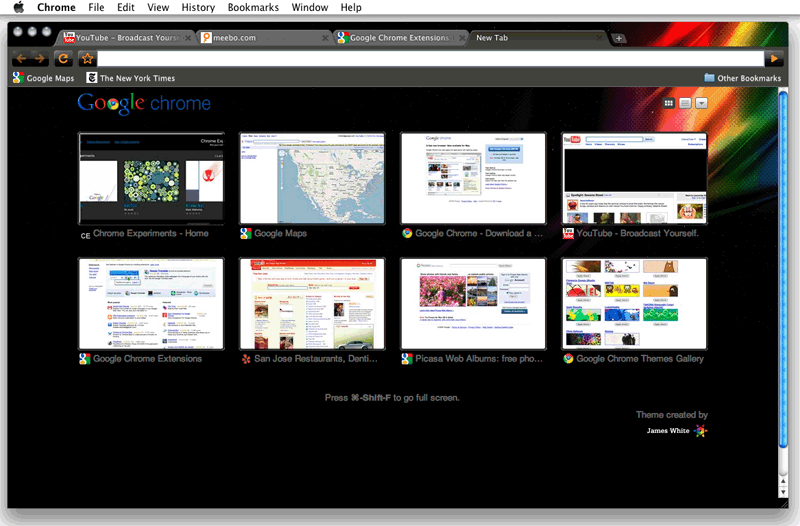
  • Google Chrome for Mac, with an artist theme
  • Screenshot: Google Chrome for Mac, with an artist theme

Google Chrome 4.0 released: extensions and bookmark sync

Google has released 4.0 version of its web browser "Google Chrome", it adds two of the most sought-after features: extensions and bookmark sync.
Chrome extensions have been available in the beta release for about a month now, but now you can get them in the stable version. There are over 1,500 extensions in Chrome extensions gallery and you can install them on the stable version of Google Chrome.
Here is what the Official Google Blog says:

Official Google Blog: Extensions, bookmark sync and more for Google Chrome

Extensions let you add new features and functions to your browser. Some provide one-click access to some of your favorite web applications like eBay and digg, or news and information sources such as NPR and Time.com. Others are useful tweaks for performing common online tasks such as browsing photos, getting directions or shopping.
Bookmark sync is a handy feature for those of you who use several computers — say, a laptop at work and a desktop at home. You can enable bookmark sync to synchronize your bookmarks on all of your computers so that when you create a bookmark on one computer, it's automatically added across all your computers. This means that you won't need to manually recreate the bookmark each time you switch computers.

How to manager your Chrome Extensions?

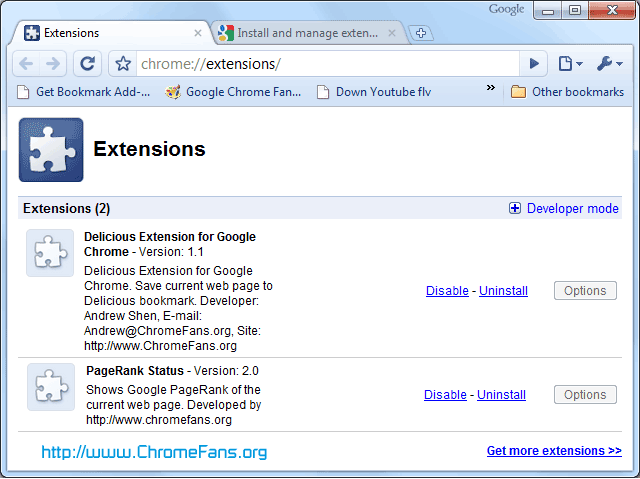
To manager your Chrome Extension, just type "chrome://extensions/" in the address bar (or click theTools -> Extensions menu), as it is shown in below screenshot:
Screenshot: manager your Chrome Extensions
Some extensions may have additional settings that you can edit. Click the Options button (if active) for the extension to see these settings. If you want uninstall a extension from Chrome, just click "Uninstall" link.

How to enable bookmark sync

CLick the menu Tools -> Synchronize my bookmarks, then sign in to your Google Account in the dialog that appears. If you've already enabled the sync feature on another computer, you'll see a prompt asking you to confirm that your different sets of bookmarks should be merged together. Click Merge and sync to finish the syncing process.

Google to stop supporting old browser - Internet Explorer 6.0

Google has announced it will begin phasing out support for Microsoft’s nearly decade-old Internet Explorer 6 web browser. Beginning March 1, IE6 users will start to find Google’s Web based applications and services - starting with Google Docs and Google Sites - will stop working well with Internet Explore 6. I am a user of Google Apps, I received a notification email from Google Apps team 2 days ago:
Dear Google Apps admin,​
In order to continue to improve our products and deliver more sophisticated features and performance, we are harnessing some of the latest improvements in web browser technology. This includes faster JavaScript processing and new standards like HTML5. As a result, over the course of 2010, we will be phasing out support for Microsoft Internet Explorer 6.0 as well as other older browsers that are not supported by their own manufacturers.
We plan to begin phasing out support of these older browsers on the Google Docs suite and the Google Sites editor on March 1, 2010. After that point, certain functionality within these applications may have higher latency and may not work correctly in these older browsers. Later in 2010, we will start to phase out support for these browsers for Google Mail and Google Calendar.
Google Apps will continue to support Internet Explorer 7.0 and above, Firefox 3.0 and above, Google Chrome 4.0 and above, and Safari 3.0 and above.
Starting this week, users on these older browsers will see a message in Google Docs and the Google Sites editor explaining this change and asking them to upgrade their browser. We will also alert you again closer to March 1 to remind you of this change.
In 2009, the Google Apps team delivered more than 100 improvements to enhance your product experience. We are aiming to beat that in 2010 and continue to deliver the best and most innovative collaboration products for businesses.
Thank you for your continued support!
Sincerely,
The Google Apps team

About Internet Explorer 6.0

Internet Explorer 6 (commonly abbreviated as IE6) is the sixth major revision of Internet Explorer, a web browser developed by Microsoft for Windows operating systems. It was released on August 27, 2001.
Microsoft Internet Explorer 6.0
It is the default browser shipped with Windows XP and Windows Server 2003. When Internet Explorer 6 was released, it included a number of enhancements over its predecessor, Internet Explorer 5.5. IE6 improved support for CSS (Cascading Style Sheets), adding support for a number of properties which previously had not been implemented and fixing bugs such as the Internet Explorer box model bug.

Google Chrome: New Security Features

Google has announced a number of security enhancements that "make it easier for developers to build secure web sites", writes Adam Barth, one of the software engineers working on the project. Some security features have already been implemented in other browsers, including Firefox and IE and in significant add-ons like NoScript.
Google Chrome Security Features

Chrome Security: Strict-Transport-Security

Strict-Transport-Security lets a high-security web site tell the browser that it wants to be contacted over a secure connection only. That means the browser will always use HTTPS to connect to the site and will treat all HTTPS errors as hard stops (instead of prompting the user to "click through" certificate errors).

Chrome Security: Cross-Origin Communication with postMessage

postMessage API provides a richer interaction and more secure communication between frames, and enables the creation of more secure versions of existing gadgets.

Chrome Security: CSRF Protection via Origin Header

The Origin header is a new HTML5 feature that helps you defend your site against cross-site request forgery (CSRF) attacks. In a CSRF attack, a malicious web site, say attacker.com, instructs the user's browser to send an HTTP request to a target server, say example.com, that confuses the example.com server into performing some action.

Chrome Security: ClickJacking Protection with X-Frame-Options

First introduced in Internet Explorer 8X-Frame-Options is a security feature that lets web sites defend themselves against clickjacking attacks. To defend against clickjacking, a web developer can request that a web page not be loaded inside a frame by including the X-Frame-Options: deny HTTP header. X-Frame-Options is implemented in Google Chrome, Internet Explorer 8, and Safari 4.

Chrome Security: Reflective XSS Protection

This feature protects against a type of cross-site scripting (XSS) attack. IE8 introduced an XSS filter which checks if a script that is about to be run is also present in the HTTP request for the page, which is a strong clue that it is an XSS attack. The XSS filter is similar to those found in Internet Explorer 8 andNoScript. Google is implementing their support in the WebKit rendering engine which has some technical advantages and also allows other WebKit-based browsers, such as Apple's, to get the same benefits.